
Frontend Event Submission – The Complete WordPress Frontend Event Submission Addons
Frontend Event Submission allows your site visitors and registered users to submit events directly from the frontend of your WordPress website. It works seamlessly with Xylus Events Calendar and 4 other popular event plugins, including Import Social Events, Import Eventbrite Events, Import Meetup Events, and WP Event Aggregator. With built-in email notifications, moderation controls, anti-spam protection, custom fields, GDPR compliance tools, and a submissions dashboard, managing community-submitted events has never been easier.
🔥 Key Features of Frontend Event Submission
📝 Powerful Frontend Submission Form
- ✅ Multi-Step Form with a modern, clean wizard-style interface.
- ✅ Accepts Event Title, Description, Start/End Date & Time, Location, Organizer, and Event Image.
- ✅ Custom Fields Support for Source URL, Source ID, and Submitter Contact fields.
- ✅ Guest Submissions — Allow non-logged-in visitors to submit events (optional).
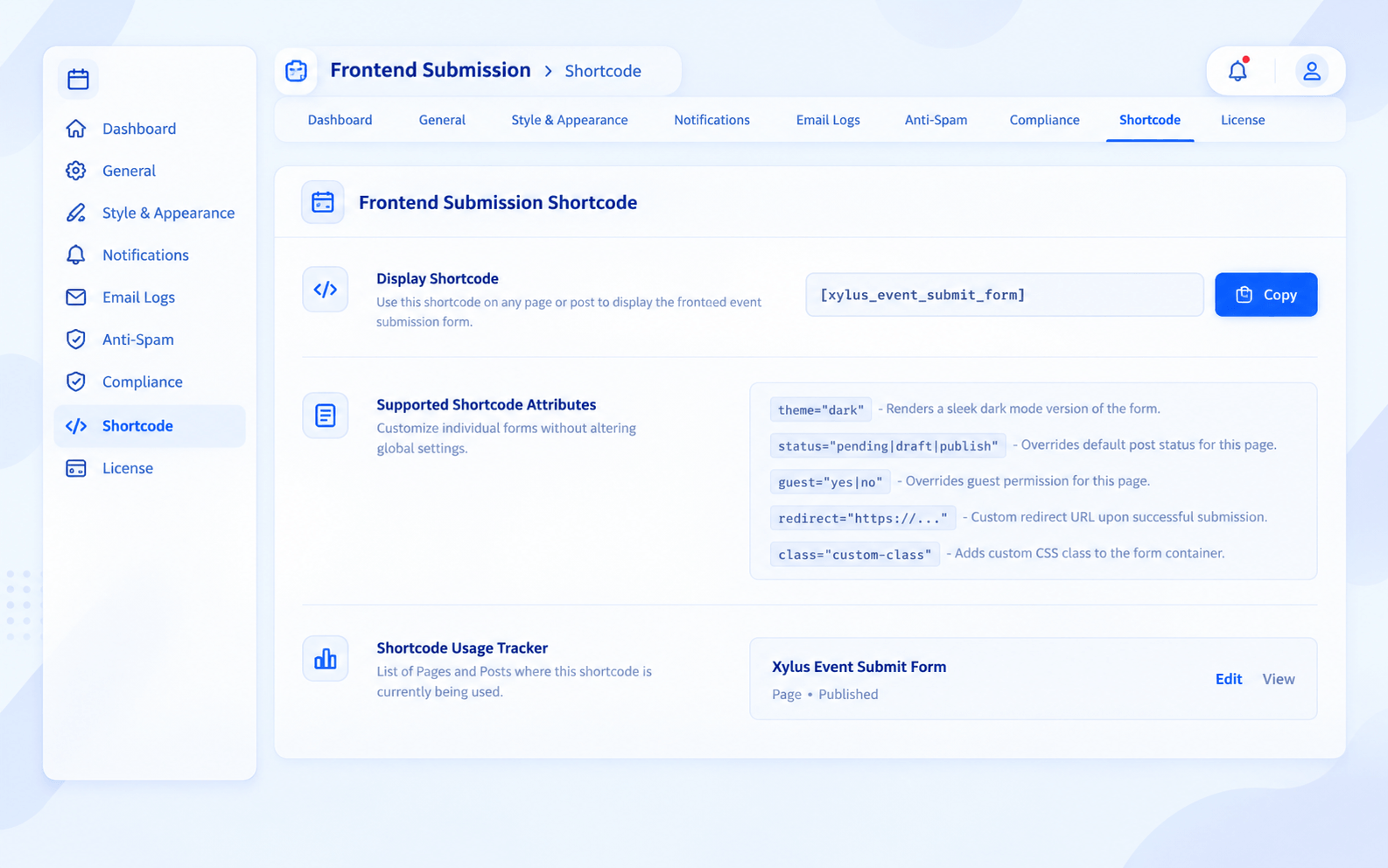
- ✅ Shortcode-Based — Embed the form anywhere with
[xylus_event_submit_form]. - ✅ Shortcode Attributes — Override default settings per form:
status,guest,redirect,theme,class.
🔌 Multi-Plugin Compatibility
- ✅ Xylus Events Calendar (XEC) — Full native support.
- ✅ Import Social Events (IFE) — Submit to Facebook Events post type.
- ✅ Import Eventbrite Events (IEE) — Submit to Eventbrite Events post type.
- ✅ Import Meetup Events (IME) — Submit to Meetup Events post type.
- ✅ WP Event Aggregator (WPEA) — Submit to WP Events post type.
- ✅ Auto-Detection — Automatically detects active event plugin and configures itself.
📧 Email Notifications & Reports
- ✅ Admin Notification — Notify admin on every new event submission.
- ✅ Submitter Confirmation — Send confirmation email to the submitter upon submission.
- ✅ Moderation Alerts — Notify submitters when their event is approved or rejected.
- ✅ Monthly Reports — Automated monthly summary of all frontend submissions sent to admin.
- ✅ Custom Email Templates — Fully customizable email subject and body with dynamic placeholders like
{event_title},{submitter_name},{event_date},{status}. - ✅ Configurable Recipients — Set custom admin email addresses for notifications.
🛡️ Anti-Spam & Security
- ✅ Google reCAPTCHA v3 — Invisible spam protection with configurable score threshold.
- ✅ Honeypot Field — Hidden field to catch bots automatically.
- ✅ Submission Speed Trap — Detects and blocks ultra-fast bot submissions.
- ✅ Rate Limiting — Prevent spam by limiting submissions per user/IP per time window.
- ✅ Duplicate Event Detection — Automatically checks for and prevents duplicate submissions.
- ✅ CSRF Nonce Verification — WordPress nonce protection on all form submissions.
⚙️ Moderation & Workflow
- ✅ Default Post Status — Set new submissions as Pending, Draft, or Published.
- ✅ Admin Moderation Queue — Review submissions in wp-admin before publishing.
- ✅ Status Change Notifications — Submitters automatically notified when their event status changes (Pending → Published, etc.).
🔒 GDPR & Privacy Compliance
- ✅ Terms & Conditions Checkbox — Require users to accept terms before submitting.
- ✅ GDPR Consent Checkbox — Collect explicit consent for data processing.
- ✅ Custom Consent Text — Fully editable terms and GDPR consent messages.
- ✅ WordPress Privacy Integration — Supports WordPress privacy data export and erasure requests.
📊 Admin Submissions Dashboard
- ✅ Visual Submissions Graph — Monthly bar chart of frontend submissions.
- ✅ Status Breakdown — See submissions by status (Published, Pending, Draft, Trashed).
- ✅ Per-User Stats — View top submitters with individual counts.
- ✅ Total Submissions Counter — Quick overview of all-time submission volume.
👤 “My Submissions” Frontend Dashboard
- ✅ Shortcode-Based — Display with
[xylus_my_submissions]on any page. - ✅ View Submitted Events — Users can see all their submitted events.
- ✅ Status Tracking — Users can track whether their events are Pending, Published, or Rejected.
🎨 Style & Appearance Customization
- ✅ Primary Color — Customize form accent colors.
- ✅ Hover & Submit Button Colors — Fine-tune button styles.
- ✅ Card Background — Set form section background colors.
- ✅ Border Radius — Control the roundness of form elements.
- ✅ Form Max Width — Set a custom maximum width for the form.
- ✅ Font Family — Choose from System UI, Inter, Roboto, Open Sans, Poppins, or inherit from theme.
- ✅ Dark Mode — Built-in dark theme support via shortcode:
[xylus_event_submit_form theme="dark"]. - ✅ Custom CSS — Add your own CSS for advanced styling.
- ✅ Step Headers Toggle — Show or hide multi-step section headers.
🚀 Frontend Event Submission Pro Installation
- Install the free version of this plugin from WordPress.org.
- Download the “Frontend Event Submission Pro” plugin from your profile at XylusThemes.
- Unzip the package and upload it to your
/wp-content/plugins/directory or install it via wp-admin by uploading the ZIP file. - Log into WordPress and navigate to the “Plugins” screen.
- Locate “Frontend Event Submission Pro” in the list and click the “Activate” link.
📋 Quick Setup Guide
- Go to Frontend Submission → Settings → General and select your target event plugin.
- Configure Form Settings (default status, guest access, custom fields).
- Set up Email Notifications (admin alerts, submitter confirmations).
- Enable Security features (reCAPTCHA, honeypot, rate limiting).
- Customize Style & Appearance to match your theme.
- Create a new page and add the shortcode:
[xylus_event_submit_form]. - Optionally create a “My Submissions” page with:
[xylus_my_submissions].
📌 Available Shortcodes
| Shortcode | Description |
|---|---|
[xylus_event_submit_form] | Displays the full frontend event submission form. |
[xylus_my_submissions] | Shows a dashboard of the logged-in user’s submitted events. |
[eec_event_submit_form] | Alias shortcode for backward compatibility. |
🏷️ Shortcode Parameters
| Parameter | Values | Description |
|---|---|---|
status | pending, draft, publish | Override default submission status for this form. |
guest | yes, no | Override guest submission setting for this form. |
redirect | URL | Redirect URL after successful submission. |
theme | light, dark | Apply light or dark theme to the form. |
class | CSS class name | Add a custom CSS class to the form wrapper. |
Screenshots