
Frontend Event Submission – The Complete WordPress Frontend Event Submission Add-on
Looking for a hassle-free way to let users add events to your site? Frontend Event Submission lets your community submit events straight from the frontend—no WordPress admin access required!
It plays perfectly with Easy Events Calendar and four other major event platforms: Import Social Events, Import Eventbrite Events, Import Meetup Events, and WP Event Aggregator.
Packed with automated email alerts, powerful moderation queues, iron-clad anti-spam, custom fields, GDPR readiness, and a beautiful submissions dashboard, running a community-driven calendar is finally a breeze.
🔥 Key Features of Frontend Event Submission
📝 Intuitive Frontend Submission Experience
- ✅ Sleek Multi-Step Form — A modern, wizard-style layout that guides users smoothly through the submission process.
- ✅ Capture Every Detail — Easily collect the Event Title, Description, Date & Time, Location, Organizer details, and Cover Images.
- ✅ Guest Submissions Allowed — Open your calendar to everyone by letting non-logged-in visitors submit events (fully optional).
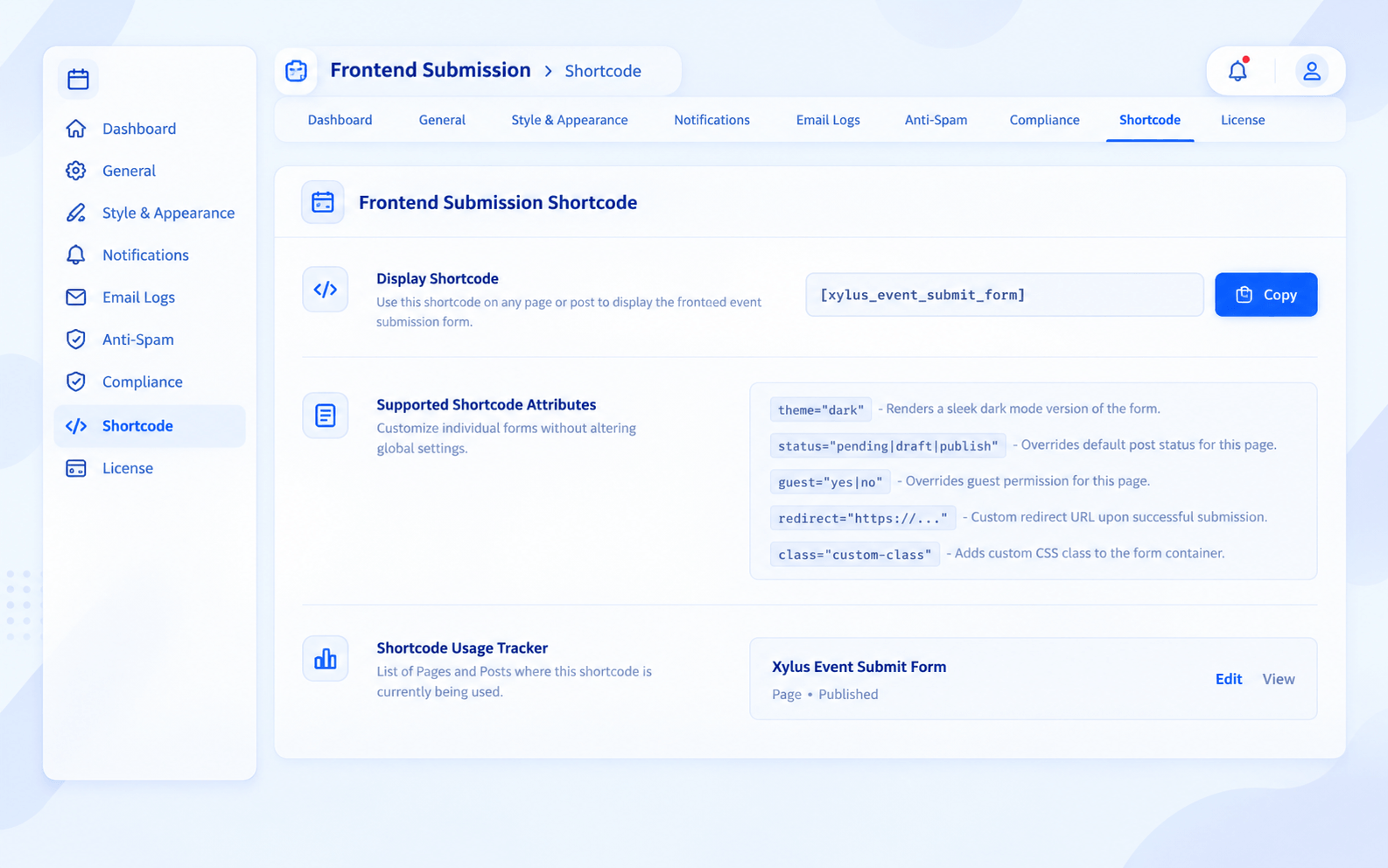
- ✅ Drop it Anywhere — Just paste the
[xylus_event_submit_form]shortcode on any page or post. - ✅ Smart Shortcode Attributes — Tailor individual forms on the fly using attributes like
status,guest,redirect,theme, andclass.
🔌 Deep Integration with Your Favorite Plugins
- ✅ Easy Events Calendar — Full, out-of-the-box native support.
- ✅ Import Social Events — Sends submissions straight to your Facebook Events post type.
- ✅ Import Eventbrite Events — Connects seamlessly with the Eventbrite Events post type.
- ✅ Import Meetup Events — Feeds directly into your Meetup Events post type.
- ✅ WP Event Aggregator — Submits to the WP Events post type without a hitch.
- ✅ Zero-Config Auto-Detection — The plugin instantly recognizes your active event calendar and sets itself up automatically.
📧 Automated Emails & Analytics
- ✅ Instant Admin Alerts — Never miss a beat; get pinged the second a new event is submitted.
- ✅ Submitter Peace of Mind — Automatically send a confirmation email so users know you got their event.
- ✅ Moderation Updates — Keep users in the loop automatically when their submission is approved or declined.
- ✅ Monthly Roundup Reports — Get a neat, automated summary of all frontend activity delivered straight to your inbox every month.
- ✅ Branded Email Templates — Craft the perfect message. Customize subjects and body text using smart tags like
{event_title},{submitter_name},{event_date}, and{status}. - ✅ Flexible Routing — Send notifications to any custom admin email addresses you choose.
🛡️ Iron-Clad Anti-Spam Protection
- ✅ Google reCAPTCHA v3 — Keep bots out invisibly, complete with custom score thresholds.
- ✅ Smart Rate Limiting — Prevent flooding by capping how many events a single user or IP can submit within a specific timeframe.
- ✅ Bulletproof Nonce Verification — Built-in WordPress CSRF protection secures every piece of data.
⚙️ Effortless Moderation Workflow
- ✅ Total Control Over Status — Decide whether new submissions are published instantly, saved as Drafts, or held as Pending.
- ✅ Clean Admin Queue — Easily review, tweak, and approve community events right from your wp-admin dashboard.
- ✅ Automated Status Alerts — Your submitters are automatically notified the moment their event goes live.
🔒 Built for Privacy & GDPR
- ✅ Mandatory Terms & Conditions — Ensure users agree to your rules before they hit the submit button.
- ✅ Explicit GDPR Consent — Add a required checkbox to get clear permission for data processing.
- ✅ Fully Editable Text — Write your own privacy policies and consent messages to match your brand voice.
- ✅ WordPress Privacy Ready — Fully compatible with core WP data export and account erasure tools.
📊 Beautiful Admin Analytics
- ✅ Visual Growth Graphs — Track your submission volume with gorgeous monthly bar charts.
- ✅ Quick Status Breakdown — See exactly how many events are Published, Pending, Drafted, or Trashed at a glance.
- ✅ Top Contributor Stats — Spot your most active community members with per-user submission counts.
- ✅ All-Time Counter — Keep an eye on your big-picture growth with total submission tracking.
👤 User-Facing “My Submissions” Hub
- ✅ Plug-and-Play Dashboard — Give users their own portal just by pasting
[xylus_my_submissions]on any page. - ✅ Personalized Event List — Users can log in and browse everything they’ve ever submitted to your site.
- ✅ Live Status Tracking — No more “did you get my event?” emails. Users can see if their event is Pending, Published, or Rejected.
🎨 Design It Your Way
- ✅ Brand-Matched Colors — Easily change the primary accent colors to fit your site’s aesthetic.
- ✅ Custom Button Styling — Fine-tune how your submit buttons look, including hover effects.
- ✅ Adjustable Border Radius — Go for sharp edges or smooth, rounded corners.
- ✅ Perfect Sizing — Set a maximum width so the form looks great in any layout.
- ✅ Beautiful Typography — Choose from modern fonts like Inter, Roboto, Open Sans, or Poppins, or just inherit your theme’s style.
- ✅ Instant Dark Mode — Support dark themes instantly with
[xylus_event_submit_form theme="dark"]. - ✅ Custom CSS Box — Total freedom for developers to add their own styling tweaks.
- ✅ Toggleable Step Headers — Keep it minimal by hiding multi-step section headers if you prefer.
📋 Quick Setup Guide
- Go to Frontend Submission → Settings → General and select your target event plugin.
- Configure your Form Settings (like guest access, default status, and custom fields).
- Set up Email Notifications so you and your users stay informed.
- Enable Security features (reCAPTCHA, honeypot, rate limiting) to keep spam away.
- Customize the Style & Appearance to perfectly match your theme.
- Create a new page and drop in the shortcode:
[xylus_event_submit_form]. - (Optional) Create a “My Submissions” page for your users using:
[xylus_my_submissions].
📌 Shortcodes Quick Reference
| Shortcode | Description |
|---|---|
[xylus_event_submit_form] | Displays the main frontend event submission form. |
[xylus_my_submissions] | Shows a clean dashboard of the logged-in user’s submitted events. |
[eec_event_submit_form] | An older alias kept around for backward compatibility. |
🏷️ Shortcode Parameters You Can Use
| Parameter | Values | Description |
|---|---|---|
status | pending, draft, publish | Override the default post status for that specific form. |
guest | yes, no | Turn guest submissions on or off for that specific form. |
redirect | URL | Send the user to a specific link after a successful submission. |
theme | light, dark | Force the form into a light or dark theme. |
class | CSS class name | Add a custom CSS class to the form’s wrapper for advanced styling. |
Screenshots